Improvement board: try out ideas and keep what works
A board on which a team puts ideas to improve its work. The team chooses a few and checks whether things really get better.
Does this sound familiar?
What is an improvement board?
An improvement board is a board on which a team collects ideas to improve its own work. The team chooses a few, tries them out and checks whether things really get better. What works becomes the new way of working. What does not work is stopped.
The difference from a suggestion box: on an improvement board, everyone can see what happens to each idea. An idea is not left in a drawer somewhere, but visibly moves from idea to trial to adopted or stopped.
Why teams use an improvement board
Staff see every day what could be better. They run into the same problems, keep looking for the same piece of equipment, type the same details in twice. An improvement board gives that experience a place, and makes sure the team does something with it together.
Which teams it suits
Any team that keeps running into the same problems and wants to tackle them together. A hospital ward that wants to improve its handover. An accounting firm whose clients keep sending their paperwork too late. A customer service team where the same question comes back every week.
The board works best alongside the everyday work. Whatever keeps getting stuck on the work board becomes an idea on the improvement board. What works becomes the new way of working. That is why there is also a combination of the two boards.
An improvement board in healthcare
Improvement boards are common in hospitals and on wards, and that is no surprise. Care staff work with fixed routines in which small things make a big difference: where a piece of equipment is kept, how a handover goes, when the family is called.
An example from a hospital ward
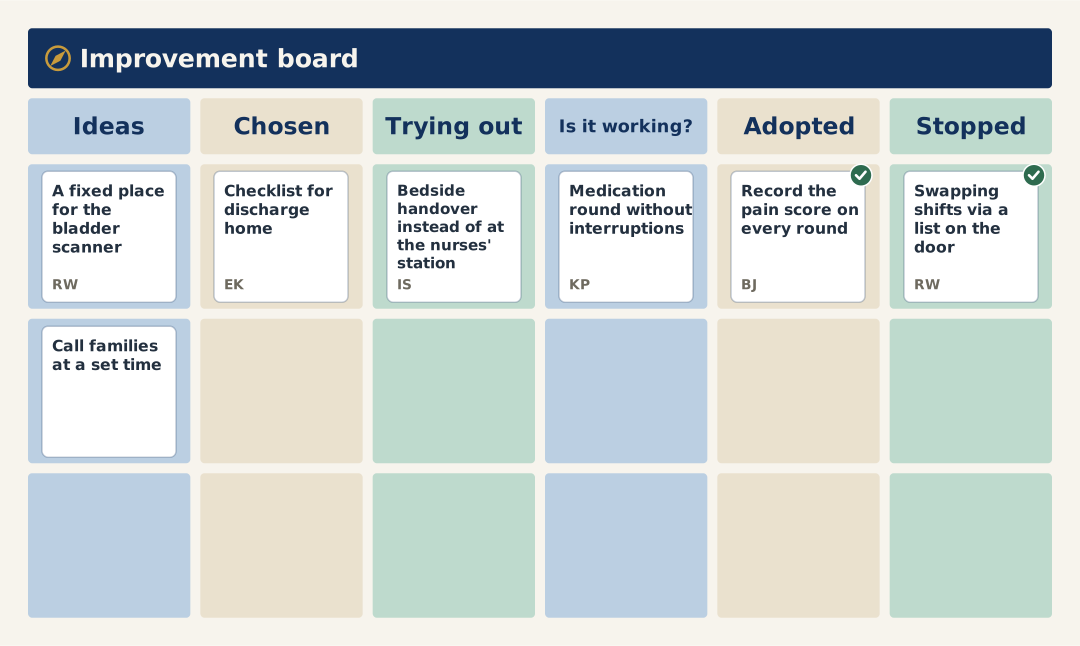
On a ward's improvement board, the ideas include a fixed place for the bladder scanner, and calling families at a set time. A checklist for discharge home has been chosen. Being tried out is a bedside handover instead of at the nurses' station. Under Is it working? is the medication round without interruptions: that will be discussed at the next meeting. Adopted is recording the pain score on every round. And stopped is swapping shifts via a list on the door: it turned out not to work any better.
What the team cannot solve itself
Some ideas are about things outside the team: the rota for the whole department, or purchasing supplies. Do not put those on your own improvement board. Pass them to whoever is responsible, and tell the team what happened to them.
An improvement board in education
Schools have improvement boards too, in the staffroom or in the department. Teachers see every day what could be better, but there is little time to tackle it together. An improvement board makes it manageable: a fixed time, a few ideas at once, and visible progress on each.
An example from a primary school
On a primary school team's improvement board, the ideas include keeping the reading books for each class in one place, and a set format for handing over to the next class. A calmer start to the day in the middle years has been chosen. Being tried out are a new rota for playground duty and sharing the marking between job-share colleagues. Under Is it working? is informing parents with one message a week: that will be discussed at the next meeting. Adopted is a fixed time for discussing each class. Stopped is changing classrooms for PE: it cost more time than it saved.
In secondary schools and childcare
In a secondary school, an improvement board works well per department or per year group. In childcare, per setting, with ideas about drop-off and pick-up or the handover to parents. It is always about ideas the team can carry out itself. And it is the team's own board, not an improvement board for pupils in the classroom.
Setting up an improvement board: the columns
An improvement board follows the path of an idea. A layout that works well:
- Ideas: everything someone raises. Not yet chosen.
- Chosen: the ideas the team is going to work on, with a name attached.
- Trying out: what is being tried now, for an agreed period.
- Is it working?: the trial is over. Now the team has to look at what it showed.
- Adopted: it works, and it is the new way of working.
- Stopped: it did not work, or turned out not to be needed. That is an outcome too.
Why an Is it working? column
This is the column most improvement boards are missing. An improvement is introduced, and nobody checks afterwards whether things really got better. By separating trying out from assessing, you make the team look before anything is set in stone.
Why a Stopped column
On many boards, an idea that does not work is left hanging. After a while the board is full of half-finished ideas and nobody looks at it any more. Stopping is a decision. Move the idea to Stopped and add a note explaining why.
The PDCA cycle on the improvement board
PDCA stands for plan, do, check, act. It is a cycle for getting a little better each time. In lean this is called continuous improvement, or by the Japanese word kaizen. An improvement board is PDCA in columns.
| PDCA | On the improvement board |
|---|---|
| Plan | Chosen: the team chooses an idea, agrees who leads it and how it will see whether things improve. |
| Do | Trying out: the idea is tried, for an agreed period. |
| Check | Is it working?: what did the trial show? |
| Act | Adopted or Stopped: it becomes the new way of working, or the team stops and says why. |
The Ideas column comes first. That is where every new round begins.
Where it usually goes wrong
Plan and do usually go fine. Check and act often get squeezed out: something is introduced, and nobody checks afterwards whether things really got better. That is why Is it working? has its own column. In Midflyt, whatever is there appears on the agenda for the improvement meeting automatically. So every meeting starts with check and act, and only then does the team choose new ideas.
Which improvement ideas belong on the board?
Ideas the team can carry out itself, preferably within a few weeks. Small is good. A fixed place for a piece of equipment saves time every day. A big project to change everything often never gets off the ground.
How to write up an idea
Describe what you want to do differently, not just what is going wrong. "Call families at a set time" is an idea. "Families call too often" is a problem. A problem can go on the board too, but the team then needs to come up with an idea for it first.
How many at once?
Few. Choose one or two new ideas at most each time. A team that improves everything at once finishes nothing, and afterwards does not know which change made the difference.
Keeping an improvement board alive
Most improvement boards start with enthusiasm and fall silent after a few months. That is rarely down to the ideas. It is down to what happens next.
Show what happens to every idea
Someone who raises an idea and never hears about it again will not raise a second one. Discuss every new idea: do we choose it, not now, or not at all? And tell the person who raised it.
A regular meeting
Every two weeks is enough for most teams. First discuss what is under Is it working?: what did the trial show, and what do we do with it? Adopt it, adjust it or stop. Then choose one or two new ideas.
A name on every card
Someone in the team leads the idea. It does not have to be the person who raised it. Without a name, nothing happens.
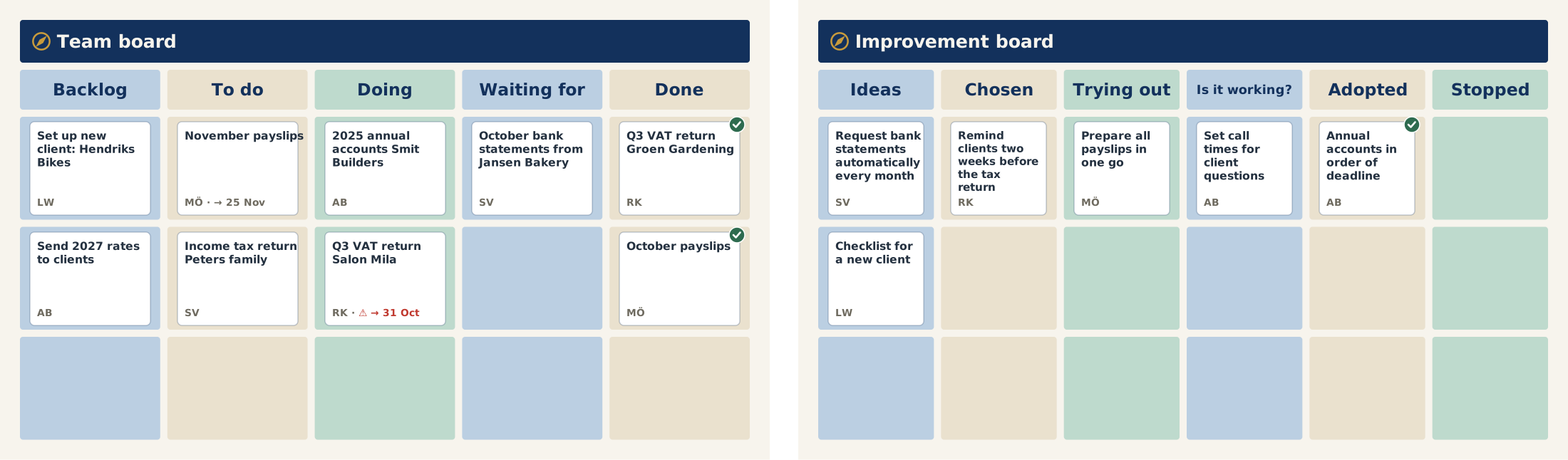
A digital improvement board or one on the wall
An improvement board on the wall has one big advantage: you walk past it every day. On a ward where everyone works in the same place, that is worth a lot.
But a board on the wall is only seen by whoever is standing in front of it. A team that works shifts, on several sites or with colleagues who partly work from home, misses out. And whatever is decided in the improvement meeting still has to be put on the board by hand.
What a digital improvement board does differently
By a digital improvement board we do not mean the interactive whiteboard in the classroom, but an improvement board on screen, for the whole team.
- Everyone sees the same board, including the night shift or a colleague at another site.
- Anyone with an idea adds it straight away, the moment it occurs to them.
- Whatever is decided in the meeting is shown right next to the idea.
- Whoever raised an idea can see what happens to it.
You can do both
It does not have to be a choice. You can also put the digital board on a large screen, on the ward or in the staffroom. Then you still walk past it, and it is up to date for everyone.
Common mistakes with an improvement board
- Too much at once. Ten ideas being tried out means none of them is really being tried.
- Not checking whether it works. A change that nobody assesses fades away, or stays in place even though it achieves nothing.
- Never stopping. A board full of old ideas does not invite new ones.
- Ideas the team cannot carry out itself. They only cause frustration. Pass them on.
- No fixed time. An improvement board that is only discussed when there is time left over never gets discussed.
How it works in Midflyt
On this board, every card is an improvement idea the team is trying out. The columns are Ideas, Chosen, Trying out, Is it working?, Adopted and Stopped.
Whatever is in Is it working? appears on the agenda automatically. In the meeting, you discuss what the trial showed and what you do with it: adopt it, adjust it or stop. Adopting or stopping goes in the decision list as a decision. Then you choose one or two new ideas at most.
You meet every two weeks (or every week, or every month).
Questions about the improvement board
What is an improvement board?
A board on which a team puts ideas to improve its work. The team chooses a few, tries them out and keeps what works.
How does an improvement board work in healthcare?
Care staff see every day what could be better. The improvement board is where you put that. In a regular meeting, you choose what to try out, and discuss what the trial showed.
Which ideas belong on an improvement board?
Ideas the team can carry out itself, preferably within a few weeks. Anything the team cannot solve itself goes to whoever can.
How often should you discuss the improvement board?
Every two weeks is enough for most teams. Choose one or two new ideas at most each time.
How do you keep an improvement board alive?
By showing what happens to the ideas. An idea that hangs around for months teaches the team that contributing is pointless. In that case, stop the idea and say why.
Who picks up an improvement idea?
Someone in the team, with their name on the card. The person who raised the idea does not have to do it themselves.
What is an improvement board in a school?
A board on which a school team puts ideas to improve its own work, such as the handover to the next class or a calmer start to the day. The team chooses a few, tries them out and checks whether things really get better. What works becomes the new way of working. It is about the teachers' work, not a board for the pupils.
What does an improvement board have to do with PDCA?
An improvement board is PDCA in columns. Plan is choosing an idea, do is trying it out, check is the Is it working? column and act is adopting or stopping. The improvement meeting always starts with Is it working?, so every change is assessed before it is set in stone.
Other ways of working
Start Monday knowing why your work matters.
You pay per board, not per person: € 50 a month for 1 board, € 90 for 2 and € 120 for 3, excluding VAT. You pay online and can start right away.